🗓️ Last Updated: 04 May 2026
Ardan Kumar | AKTV | Trading Education | 9 min read
Disclosure: This article contains Amazon affiliate links. If you purchase through these links I may earn a small commission at no extra cost to you. I only recommend products I personally use or have tested.
Read in Hindi:
Table of Contents
Think about how long you stare at a chart on your phone screen. Six seconds? You zoom in and zoom out with your fingers. Sometimes the RSI gets cut in half. Sometimes support and resistance disappear off the edge of the screen. The entry is right in front of you but the confusion of a small screen stops you from taking the trade. And when you do take it, it goes wrong.
Here is the truth, it is not your fault. It is the fault of the tool you are using. You are trying to run a professional business with something that was never built for it. Trading is not a time pass. It is a serious business. And every serious business requires the right infrastructure.
In this guide I will show you how to build a complete dual monitor trading PC for ₹15,000 to ₹17,000. Two monitors, keyboard, mouse, CPU, speakers; a full working setup that will change how you trade.
Why Mobile Trading is Holding You Back
On a mobile phone you can only view one chart at a time. If you want to watch Bank Nifty while monitoring its heavyweight stocks like HDFC Bank, ICICI Bank and SBI, you have to switch screens constantly. Multi-timeframe analysis, the foundation of professional trading, is virtually impossible on mobile.
On a PC with two monitors you can display a 5-minute or 15-minute chart on one screen and a 1-hour or daily timeframe on the other simultaneously. You can run four charts in split-screen across two monitors. You can watch news and option chain data at the same time. This gives you the complete picture of the market, not just a fragment of it.
There is also stability. When the market moves fast, mobile apps slow down, the network drops or the app freezes. On a PC with a wired internet connection your experience is stable and reliable. In live market conditions this stability is the difference between profit and loss.
The Complete Budget Build Under ₹15,000
We are not spending money on aesthetics here. Every rupee goes toward performance. Here is the complete parts list with Amazon links.
1. Processor + Motherboard + RAM Combo in ₹4,000 to ₹5,000
The brain of this setup is an Intel i5 4th Generation processor with a motherboard and 8GB DDR3 RAM. You can buy all three as a combo from Amazon. Many people will say this is an old processor, and they are right. But here is the thing, we are not gaming. We are not doing video rendering. We want charts to run smoothly, the browser to perform fast and the system to handle multiple tabs without hanging. This processor does all of that perfectly.
Buy on Amazon: Processor + RAM + Motherboard + CPU Fan Combo
2. NVMe SSD 256GB in ₹3,500
This is the most important component and the one where you should not cut corners. An NVMe SSD boots your PC in 8 to 10 seconds. Your applications open instantly. The system does not hang even with 20 tabs open. If you use an old HDD instead, you will spend the first 5 minutes of market hours waiting for your PC to wake up.
Buy on Amazon: 256GB NVMe SSD
3. Cabinet in ₹500 to ₹800
A simple basic cabinet. No RGB, no glass panels. Just performance. You can find one for ₹500 to ₹600 in an offline market or buy online.
Buy on Amazon: Basic PC Cabinet
4. SMPS in ₹500
A basic power supply unit. Nothing fancy needed for this build.
Buy on Amazon: Basic SMPS
5. Keyboard and Mouse Combo in ₹300
Always use wired keyboard and mouse for trading. Wireless devices have latency. When you need to execute an order in a fast moving market, you want zero delay between your hand and the screen.
Buy on Amazon: Wired Keyboard and Mouse Combo
6. Speakers in ₹200 to ₹250
Small basic speakers for news audio. That is all you need.
Buy on Amazon: Basic PC Speakers
7. Dual 22-Inch Monitors in ₹6,000 to ₹7,000 (pair)
This is the game changer. Two 22-inch monitors give you a workspace where you never have to switch windows. Charts and indicators on one screen. Watchlist, option chain, news and order window on the other. The motherboard in our ₹5,000 combo already has two video output ports, one HDMI and one VGA. Connect one monitor to each, select Extend Display in Windows and your dual screen setup is ready. The mouse moves seamlessly from one screen to the other.
Buy on Amazon: 22 Inch Monitor (buy two)
Complete Budget Breakdown
| Component | Price |
|---|---|
| i5 4th Gen + 8GB RAM + Motherboard Combo | ₹4,000 – ₹5,000 |
| 256GB NVMe SSD | ₹3,500 |
| Cabinet | ₹500 – ₹800 |
| SMPS | ₹500 |
| Keyboard + Mouse (wired) | ₹300 |
| Speakers | ₹200 – ₹250 |
| Two 22-inch Monitors | ₹6,000 – ₹7,000 |
| Total | ₹15,000 – ₹17,350 |
Pro tip: Check prices online first, then go to your local computer market and negotiate 15% less. The shop owner will also assemble the PC, install Windows and hand you a fully working system. Buy monitors and accessories online where deals are available.
How to Set Up Dual Monitors
Once your PC is assembled, connect one monitor to the HDMI port and the second monitor to the VGA port on your motherboard. Power both on. Right click on your Windows desktop and select Display Settings. Under Multiple Displays choose Extend these displays. That is it. Your mouse will now move from one screen to the other and your workspace is doubled.
Want to add a third or fourth monitor in the future? Buy a basic 2GB graphics card for ₹1,800 to ₹2,000. It adds two more video output ports and your setup scales up without needing a new PC.
My Personal Advanced Trading Setup
I started with a basic system, even simpler than the one described above. Over the years as trading became more serious the setup evolved naturally. Here is what my current workstation looks like:
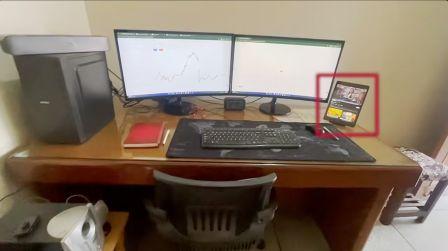
I use two large curved Samsung monitors which reduce eye strain during long trading hours. My CPU is more powerful now which makes multitasking easier. I keep a laptop as a backup so work never stops in an emergency or when I travel. I use an iPad to follow news and market commentary. Orders are executed from my phone.
I also have a separate system for video editing, professionals never mix their work environments. But none of this happened on day one. Every great setup starts with a small, accurate beginning. It is not necessary to have a setup worth lakhs on day one. What matters is starting with the right tools so you trade with data, not emotion.
What Software to Use on Your New Setup
Once your dual monitor PC is ready, here is how to use the two screens effectively:
Screen 1 Charts: Open TradingView in full screen. Use the multi-chart layout to display NIFTY 5-minute on one half and daily timeframe on the other.
Screen 2 Execution: Keep your broker platform open: Zerodha Kite, Upstox or Angel One. Keep a watchlist of your 5 to 10 stocks on this screen along with the option chain.
For live signals on what stocks are moving right now, use AKTV Radar, it scans 200+ NSE stocks every 5 minutes for EMA crossover signals, completely free with no login required. Keep it open on Screen 2 during market hours.
Conclusion
A ₹15,000 setup will give you the same professional confidence that a mobile phone never can. Your capital should go into your trading account, not into an expensive desk. This budget build handles TradingView, Zerodha, multiple chart timeframes and news simultaneously without a single lag.
Work hard, keep learning, make profits and gradually build the trading setup of your dreams. Every expert started exactly where you are right now.
If you have questions about this PC build, drop them in the comments below. And if you want to watch the full video walkthrough of this setup, watch it here: AKTV YouTube Channel.
Watch a complete video on this: Click Here
Read in Hindi:
Also read: Fair Value Gap; Order Block and Reaction Block
Also read: Fake Breakout: How the Stock Market Traps Retail Traders
Also read: Risk Management in Trading
Disclaimer: Trading involves significant financial risk. This article is for educational purposes only. AKTV is not SEBI registered. Affiliate disclosure: This article contains Amazon affiliate links.
Written by: Ardan Kumar | Founder | aktv.in

About the Author
Ardan Kumar
Ardan Kumar is the founder of AKTV, a free trading education platform for Indian retail traders. He served 8 years in the Indian Air Force as an Aircraft Maintenance Engineer, working on Mi-17 helicopters and earning special service medals for Operation Rhino in the Mizo and Naga Hills. After leaving the Force, he entered the stock market, learned trading the hard way, and built AKTV to teach others what took him years to figure out. He holds an MBA in Marketing and Finance from CRSU Jind where he topped the course, and has cleared UGC-NET in Management. He is also the co-founder of One Percent Capital LLC, Texas, USA. His YouTube channel AKTV Business has over 27,000 subscribers. Everything on AKTV is free: no login, no payment, no hidden charges.